Understanding Containers: Containers vs Traditional Deployment
"It works on my machine" is probably the most expensive sentence in software. Containers exist to make sure that what works on your machine works the same way in test and production. This post explains what a container actually is, how it differs from installing apps on servers or virtual machines, and when each approach makes sense.
Three ways to run an application
1. Bare metal: install directly on a server
You install Java, Nginx, the app and its libraries straight onto the operating system of a physical server.
- Maximum performance, nothing in between.
- One server = usually one purpose; scaling means buying hardware.
- Apps share the same libraries; upgrading Java for one app can break another.
- Servers drift: after two years nobody knows exactly what is installed.
2. Virtual machines (VMs)
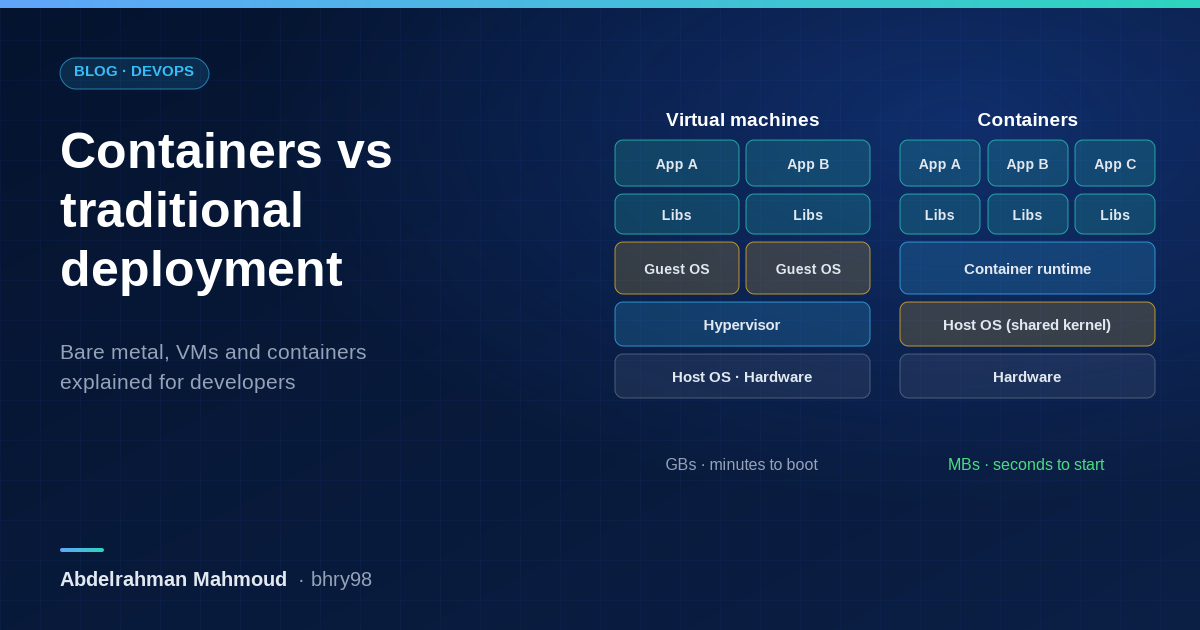
A hypervisor (VMware ESXi, KVM, Hyper-V) splits one physical server into many virtual ones. Each VM runs a full guest operating system with its own kernel.
- Strong isolation, run Windows and Linux side by side.
- Snapshots, live migration, better hardware use.
- Each VM carries a whole OS: gigabytes of disk, RAM for the kernel, minutes to boot, and one more OS to patch.
3. Containers
A container packages the application with everything it needs (runtime, libraries, config defaults) into an image, and runs it as an isolated process on a shared Linux kernel. No guest OS, no hypervisor.
- Megabytes instead of gigabytes; starts in seconds.
- The same image runs on a laptop, in CI, in test and in production.
- Dozens of containers per host, each with its own dependencies.
- Weaker isolation than VMs (shared kernel), and you need new skills and tools.
What a container really is
A container is not a small VM. It is a normal Linux process with three kernel features around it:
| Feature | What it does |
|---|---|
| Namespaces | Give the process its own view of PIDs, network, mounts, hostname and users, so it thinks it is alone on the machine |
| cgroups | Limit and measure CPU, memory and I/O (this is what --memory=512m uses) |
| Union / overlay filesystem | Stack read-only image layers plus a thin writable layer on top |
You can see this yourself: run a container and look for its process on the host.
docker run -d --name web nginx:stable-alpine
ps aux | grep "nginx: master"      # it's just a process on the host
Images vs containers
- An image is a read-only template, built from a
Dockerfile, stored in a registry (Docker Hub, Quay, GHCR, Nexus, Harbor). - A container is a running instance of an image. You can start ten containers from one image.
FROM eclipse-temurin:21-jre          # base image: OS libraries + Java runtime
WORKDIR /app
COPY target/orders-api.jar app.jar   # your application
EXPOSE 8080
USER 1001                            # don't run as root
ENTRYPOINT ["java", "-jar", "app.jar"]
That image now contains exactly Java 21 and your JAR, on any host that has a container runtime. (Not sure what JRE means here? See JDK vs JRE vs JVM.)
Side-by-side comparison
| Bare metal | Virtual machine | Container | |
|---|---|---|---|
| Isolation unit | Physical server | Full OS with own kernel | Process with namespaces |
| Size | Whole server | GBs | MBs to a few hundred MBs |
| Start time | Minutes (boot) | Minutes | Seconds or less |
| Density per host | 1 | Tens | Hundreds |
| Isolation strength | Physical | Strong (hardware virtualization) | Good, shared kernel |
| Portability | Low | Medium (image formats differ) | High (OCI standard) |
| Config drift | High | Medium | Low (immutable images) |
| OS patching | Per server | Per VM | Rebuild the image from an updated base |
| Run Windows apps on Linux host | No | Yes | No (containers share the host kernel type) |
Containers in production: orchestration
One container on a laptop is easy. Hundreds across many servers need an orchestrator that schedules containers, restarts them when they crash, scales them, and routes traffic:
- Kubernetes: the industry standard.
- Red Hat OpenShift: Kubernetes with security, routing, registry and CI built in (see OpenShift is not just Kubernetes).
- Docker Compose: for a single host, development and small setups.
Containers also change how apps should behave. They should be stateless (keep files in object storage, not on local disk: see S3 vs local storage), read config from environment variables, log to stdout, and expose health checks.
Common myths
- "Containers are lightweight VMs." No kernel, no boot, no hypervisor: they are processes.
- "Containers are secure by default." Not if you run them as root with every capability. Use non-root users, minimal base images and image scanning. OpenShift enforces much of this.
- "Docker = containers." Docker popularised them, but images follow the open OCI standard; Podman, containerd and CRI-O run the same images.
- "Containers replace VMs." In most companies, containers run on VMs. They solve different problems and work well together.
When traditional deployment is still the right call
- Legacy apps that expect a full OS, hard-coded paths, or GUI access.
- Heavy, stateful databases where a dedicated, tuned VM is simpler to operate.
- Windows desktop software or licences tied to a machine.
- Very small teams with one or two stable apps and no appetite for an orchestrator.
Takeaway
Bare metal gives raw power, VMs give strong isolation, and containers give speed, density and "build once, run anywhere". For new services and APIs, containers on Kubernetes or OpenShift are the default today; for legacy and heavy stateful systems, a well-managed VM is still a fine answer.
Try it yourself: run Nginx in a container with the Docker option of How to install Nginx.