How to secure a Spring Boot API with Keycloak
Before you start
- You need a running Keycloak: How to install Keycloak.
- You need a Spring Boot API to protect: How to create a simple CRUD API in Spring Boot.
When an organization runs many services, each one managing its own users quickly becomes a security problem. Keycloak centralizes authentication; your Spring Boot APIs only need to check the token that comes with each request. They never see a password.
By the end of this guide you will have:
- Keycloak roles
orders.readandorders.writeassigned to a user - A Spring Boot API that rejects requests without a valid token (
401) - Role checks with
@PreAuthorize(403when the role is missing) - A tested flow with
curl
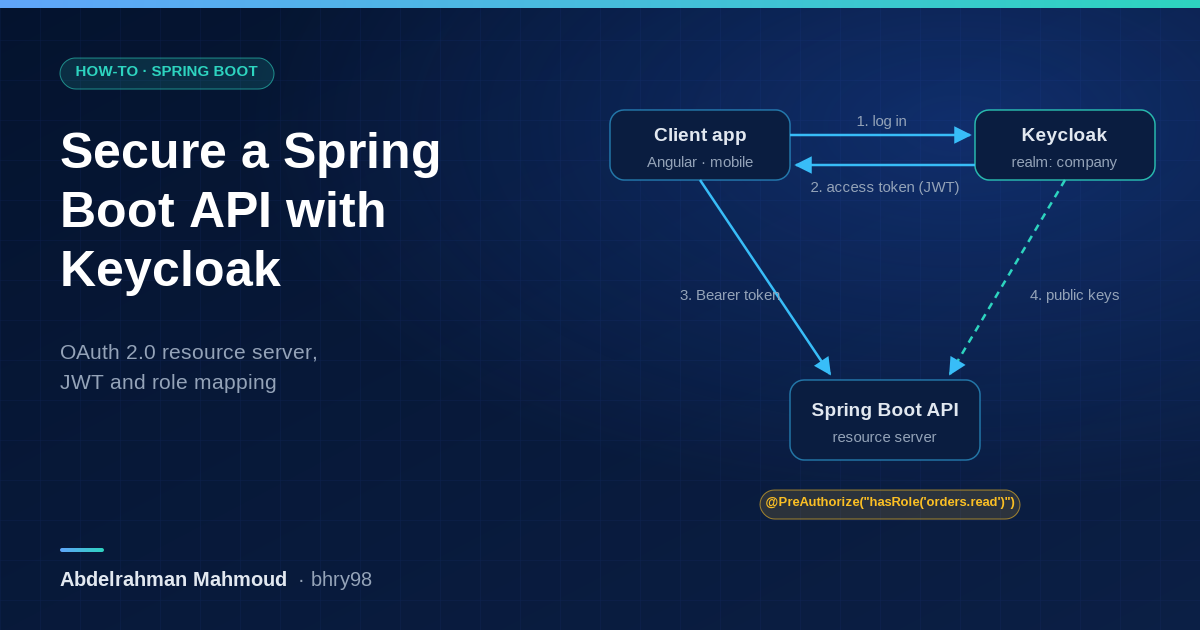
How it fits together
sequenceDiagram
    participant C as Client app
    participant K as Keycloak
    participant A as Spring Boot API
    C->>K: Log in (OIDC)
    K->>C: Access token (JWT)
    C->>A: GET /api/orders + Bearer token
    A->>K: Fetch signing keys (once, cached)
A->>C: 200 OK, or 401 / 403Prerequisites
| Requirement | Version |
|---|---|
| Keycloak | 24+ (this guide uses realm demo at http://localhost:8080) |
| Java | 17 or 21 (which JDK?) |
| Spring Boot | 3.x |
curl and jq |
for testing |
Step 1: Configure Keycloak
In the demo realm:
- Realm roles → Create role:
orders.read, then again fororders.write. - Users →
alice→ Role mapping → Assign role → selectorders.read. (Leaveorders.writeunassigned so we can test a403.) - Clients → Create client:
orders-ui: OpenID Connect, public client, Standard flow (your front end, with PKCE).- For testing in this guide, also enable Direct access grants on it so
curlcan get a token.
Users in Active Directory?
Add User federation → LDAP in the realm and map AD groups to roles. Secure that connection with LDAPS: How to secure Active Directory with LDAPS.
Step 2: Make the API an OAuth 2.0 resource server
Add the dependency:
<dependency>
  <groupId>org.springframework.boot</groupId>
  <artifactId>spring-boot-starter-oauth2-resource-server</artifactId>
</dependency>
Point it at the realm:
spring:
  security:
    oauth2:
      resourceserver:
        jwt:
          issuer-uri: http://localhost:8080/realms/demo
With issuer-uri set, Spring downloads Keycloak's public keys and checks every token's
signature, expiry and issuer automatically.
Step 3: Map Keycloak roles to Spring authorities
Keycloak puts realm roles in a realm_access.roles claim, which Spring does not read by default.
This configuration fixes that and secures every endpoint:
@Configuration
@EnableMethodSecurity
class SecurityConfig {

    @Bean
    SecurityFilterChain api(HttpSecurity http) throws Exception {
        http
            .authorizeHttpRequests(auth -> auth
                .requestMatchers("/actuator/health/**").permitAll()
                .anyRequest().authenticated())
            .oauth2ResourceServer(oauth -> oauth
                .jwt(jwt -> jwt.jwtAuthenticationConverter(keycloakRoles())))
            .sessionManagement(s -> s.sessionCreationPolicy(SessionCreationPolicy.STATELESS))
            .csrf(csrf -> csrf.disable()); // stateless API with bearer tokens, no cookies
        return http.build();
    }

    private JwtAuthenticationConverter keycloakRoles() {
        var converter = new JwtAuthenticationConverter();
        converter.setJwtGrantedAuthoritiesConverter(jwt -> {
            Map<String, Object> realmAccess = jwt.getClaimAsMap("realm_access");
            if (realmAccess == null) return List.of();
            @SuppressWarnings("unchecked")
            var roles = (Collection<String>) realmAccess.getOrDefault("roles", List.of());
            return roles.stream()
                .map(role -> (GrantedAuthority) new SimpleGrantedAuthority("ROLE_" + role))
                .toList();
        });
        converter.setPrincipalClaimName("preferred_username");
        return converter;
    }
}
Step 4: Protect endpoints with roles
Authorization now reads like the business rules:
@RestController
@RequestMapping("/api/orders")
class OrderController {

    @GetMapping
    @PreAuthorize("hasRole('orders.read')")
    List<Order> list() { ... }

    @PostMapping
    @PreAuthorize("hasRole('orders.write')")
    Order create(@RequestBody @Valid Order order) { ... }

    @GetMapping("/me")
    Map<String, Object> me(@AuthenticationPrincipal Jwt jwt) {
        return Map.of("user", jwt.getClaimAsString("preferred_username"));
    }
}
Start the API on port 8081 (Keycloak already uses 8080):
Verify it works
No token → 401:
Get a token for alice:
TOKEN=$(curl -s -X POST http://localhost:8080/realms/demo/protocol/openid-connect/token \
  -d grant_type=password -d client_id=orders-ui \
  -d username=alice -d password='your-password' | jq -r .access_token)
With token and the orders.read role → 200:
Without the orders.write role → 403:
curl -i -X POST -H "Authorization: Bearer $TOKEN" -H "Content-Type: application/json" \
  -d '{"product":"book","quantity":1}' http://localhost:8081/api/orders
Assign orders.write to alice in Keycloak, get a new token, and the POST succeeds.
Done. Your API trusts Keycloak tokens and enforces roles.
Service-to-service calls
For backend-to-backend calls, use the client credentials grant: create a confidential client with Service accounts roles enabled, give that service account its own roles, and the calling service gets its own token. Every call is authenticated and auditable.
curl -s -X POST http://localhost:8080/realms/demo/protocol/openid-connect/token \
  -d grant_type=client_credentials -d client_id=billing-service -d client_secret=*** | jq .
Mistakes I see most often
- Wildcard redirect URIs such as
*on clients. Always list exact URLs. - Not checking the audience when many clients share a realm. Add an audience mapper in
Keycloak and validate
audin the API. - Long-lived access tokens. Keep them short (minutes) and rely on refresh tokens.
- Using the password grant in real apps. It's only for testing here; front ends must use the Authorization Code flow with PKCE.
- Doing all authorization in Keycloak. Use roles as input, but keep business rules such as "a user can only see their own orders" in the service.
Troubleshooting
Every request returns 401, even with a token
The token's iss claim must exactly match issuer-uri. A token requested via
http://127.0.0.1:8080 has a different issuer than http://localhost:8080. Decode the token on
https://jwt.io and compare.
403 although the user has the role
Check the roles are realm roles (in realm_access), not client roles (in
resource_access.<client>.roles), and that you request a new token after changing roles.
API fails to start: Unable to resolve the Configuration with the provided Issuer
The API can't reach Keycloak at startup. Check the URL and that Keycloak is running, or use
jwk-set-uri instead of issuer-uri.