How to configure Nginx as a reverse proxy, load balancer and HA pair
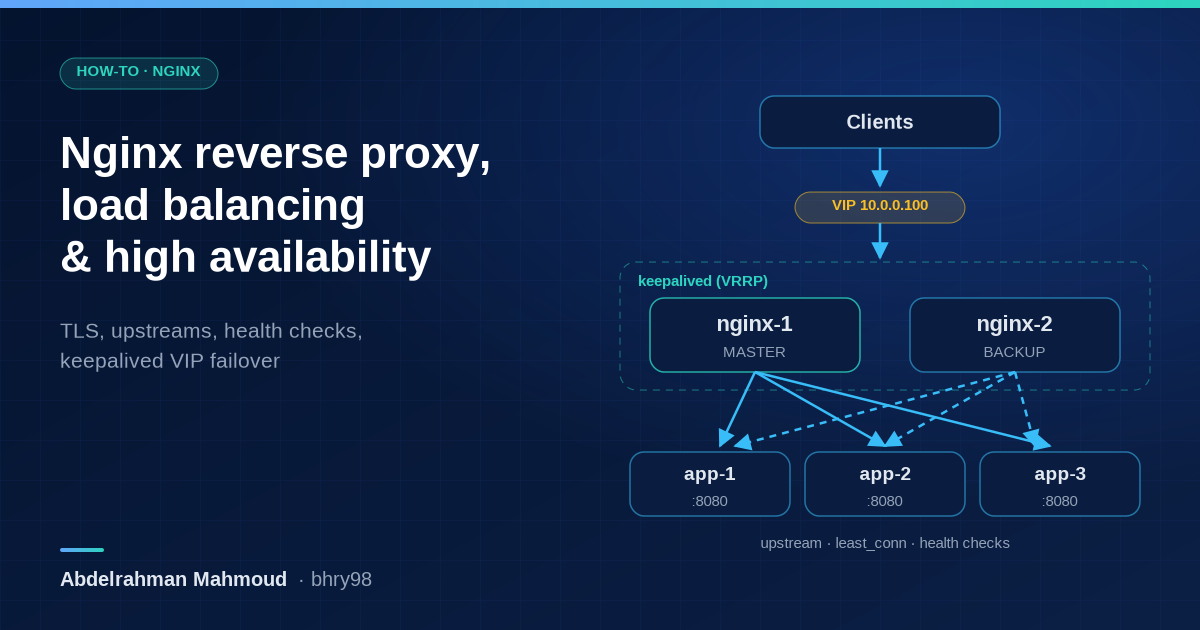
Before you start
- Understand what Nginx is and why we use it (reverse proxy, load balancer, TLS termination).
- Have Nginx installed on two servers: How to install Nginx.
This guide builds the setup in the picture, one layer at a time. Each step works on its own, so you can stop after the reverse proxy if that is all you need.
By the end of this guide you will have:
- Nginx proxying HTTPS traffic to a backend application
- Traffic load balanced across three app servers, with failover
- Two Nginx servers sharing a virtual IP with keepalived, so one can die without downtime
Lab used in this guide
| Host | IP | Role |
|---|---|---|
lb1 |
10.0.0.21 |
Nginx + keepalived (MASTER) |
lb2 |
10.0.0.22 |
Nginx + keepalived (BACKUP) |
| VIP | 10.0.0.100 |
Floating IP, DNS app.bhry98.local points here |
app1 to app3 |
10.0.0.11 to .13 |
Your application on port 8080 |
No app to test with?
Run a tiny echo server on each app host, it prints which host answered:
docker run -d -p 8080:8080 --name echo hashicorp/http-echo -listen=:8080 -text="hello from $(hostname)"
Step 1: A simple reverse proxy
On lb1, create a server block that forwards everything to one app server:
server {
    listen 80;
    server_name app.bhry98.local;

    location / {
        proxy_pass http://10.0.0.11:8080;

        # Tell the app who the real client is and what URL was requested
        proxy_set_header Host              $host;
        proxy_set_header X-Real-IP         $remote_addr;
        proxy_set_header X-Forwarded-For   $proxy_add_x_forwarded_for;
        proxy_set_header X-Forwarded-Proto $scheme;
    }
}
RHEL / Rocky: 502 Bad Gateway?
SELinux blocks Nginx from opening network connections by default. Allow it once:
sudo setsebool -P httpd_can_network_connect 1
Why the X-Forwarded-* headers matter
Without them, your app sees every request as coming from the proxy's IP over plain HTTP. Spring
Boot reads them with server.forward-headers-strategy=framework; Keycloak with
--proxy-headers=xforwarded.
Step 2: Load balance across several servers
Replace the single address with an upstream group:
upstream app_backend {
    least_conn;                                  # (1)!
    server 10.0.0.11:8080 max_fails=3 fail_timeout=30s;  # (2)!
    server 10.0.0.12:8080 max_fails=3 fail_timeout=30s;
    server 10.0.0.13:8080 max_fails=3 fail_timeout=30s;
    # server 10.0.0.14:8080 backup;              # (3)!

    keepalive 32;                                # (4)!
}

server {
    listen 80;
    server_name app.bhry98.local;

    location / {
        proxy_pass http://app_backend;
        proxy_http_version 1.1;
        proxy_set_header Connection "";

        proxy_set_header Host              $host;
        proxy_set_header X-Real-IP         $remote_addr;
        proxy_set_header X-Forwarded-For   $proxy_add_x_forwarded_for;
        proxy_set_header X-Forwarded-Proto $scheme;

        # Retry another server when one fails
        proxy_next_upstream error timeout http_502 http_503 http_504;
        proxy_connect_timeout 3s;
        proxy_read_timeout    60s;
    }
}
- Send each request to the server with the fewest active connections. Remove it for plain round robin (the default).
- Passive health check: after 3 failures, the server is skipped for 30 seconds.
- A
backupserver only gets traffic when all the others are down. - Reuse connections to the backends instead of opening a new TCP connection per request.
Needs
proxy_http_version 1.1and an emptyConnectionheader.
Test it. The answers should rotate between app1, app2 and app3:
Stop the app on app2 and run the loop again: requests keep succeeding on the other two.
Choosing a load balancing method
| Directive | How it picks a server | Use it when |
|---|---|---|
| (none) | Round robin, optional weight= |
Requests cost about the same |
least_conn |
Fewest active connections | Requests have very different durations |
ip_hash |
Same client IP always goes to the same server | Your app keeps sessions in memory |
hash $cookie_JSESSIONID consistent |
By any key | Sticky sessions without IP issues behind NAT |
Tip
Sticky sessions are a workaround. If you can, store sessions in Redis or a database, or use stateless JWT tokens, so any server can answer any request.
Step 3: Add HTTPS
Put the certificate and key on the load balancer (from your CA, Let's Encrypt, or a self-signed one for the lab):
# Lab only: self-signed certificate
sudo mkdir -p /etc/nginx/tls
sudo openssl req -x509 -nodes -newkey rsa:2048 -days 365 \
  -keyout /etc/nginx/tls/app.key -out /etc/nginx/tls/app.crt \
  -subj "/CN=app.bhry98.local" -addext "subjectAltName=DNS:app.bhry98.local"
# Redirect all HTTP to HTTPS
server {
    listen 80;
    server_name app.bhry98.local;
    return 301 https://$host$request_uri;
}

server {
    listen 443 ssl;
    http2 on;
    server_name app.bhry98.local;

    ssl_certificate     /etc/nginx/tls/app.crt;
    ssl_certificate_key /etc/nginx/tls/app.key;
    ssl_protocols       TLSv1.2 TLSv1.3;
    ssl_session_cache   shared:SSL:10m;
    ssl_session_timeout 1d;

    add_header Strict-Transport-Security "max-age=31536000" always;
    add_header X-Content-Type-Options nosniff always;
    add_header X-Frame-Options SAMEORIGIN always;
    server_tokens off;                       # hide the Nginx version

    client_max_body_size 20m;                # max upload size

    location / {
        proxy_pass http://app_backend;
        proxy_http_version 1.1;
        proxy_set_header Connection "";
        proxy_set_header Host              $host;
        proxy_set_header X-Real-IP         $remote_addr;
        proxy_set_header X-Forwarded-For   $proxy_add_x_forwarded_for;
        proxy_set_header X-Forwarded-Proto $scheme;
        proxy_next_upstream error timeout http_502 http_503 http_504;
    }

    # Don't expose management endpoints to the internet
    location /actuator/ {
        deny all;
    }
}
sudo nginx -t && sudo systemctl reload nginx
curl -k -I https://10.0.0.21/ -H "Host: app.bhry98.local"
Step 4: Common proxy recipes
# in the http {} context
proxy_cache_path /var/cache/nginx/app levels=1:2 keys_zone=app_cache:10m
                 max_size=1g inactive=60m use_temp_path=off;

location /api/catalog/ {
    proxy_cache app_cache;
    proxy_cache_valid 200 5m;
    proxy_cache_use_stale error timeout updating http_502 http_503;
    add_header X-Cache-Status $upstream_cache_status;
    proxy_pass http://app_backend;
}
Step 5: High availability with keepalived
So far lb1 is a single point of failure. Now copy the same Nginx configuration to lb2
(/etc/nginx/conf.d/ and /etc/nginx/tls/), then let keepalived float a virtual IP between
them using VRRP. Clients and DNS only know the VIP 10.0.0.100.
sequenceDiagram
    participant C as Clients
    participant V as VIP 10.0.0.100
    participant L1 as lb1 (MASTER)
    participant L2 as lb2 (BACKUP)
    C->>V: HTTPS
    V->>L1: lb1 holds the VIP
    L1-->>L2: VRRP heartbeat every 1s
    Note over L1: Nginx or the server dies
    L2->>V: No heartbeat: lb2 takes the VIP (~3 s)
    C->>V: HTTPS (now served by lb2)
Install keepalived on both servers:
Create a health check script that fails when Nginx is not answering:
#!/bin/sh
# Exit non-zero if nginx is down, so keepalived moves the VIP away.
pidof nginx > /dev/null || exit 1
curl -fsk -o /dev/null --max-time 2 https://127.0.0.1/ -H "Host: app.bhry98.local" || exit 1
global_defs {
    router_id lb1
    enable_script_security
    script_user root
}

vrrp_script chk_nginx {
    script "/etc/keepalived/check_nginx.sh"
    interval 2
    fall 2
    rise 2
}

vrrp_instance VI_APP {
    state MASTER
    interface eth0              # your NIC name: ip -br a
    virtual_router_id 51        # same on both, unique per network
    priority 150                # higher wins
    advert_int 1
    authentication {
        auth_type PASS
        auth_pass Bhry98Vp      # same on both, max 8 characters
    }
    unicast_src_ip 10.0.0.21
    unicast_peer {
        10.0.0.22
    }
    virtual_ipaddress {
        10.0.0.100/24
    }
    track_script {
        chk_nginx
    }
}
global_defs {
    router_id lb2
    enable_script_security
    script_user root
}

vrrp_script chk_nginx {
    script "/etc/keepalived/check_nginx.sh"
    interval 2
    fall 2
    rise 2
}

vrrp_instance VI_APP {
    state BACKUP
    interface eth0
    virtual_router_id 51
    priority 100
    advert_int 1
    authentication {
        auth_type PASS
        auth_pass Bhry98Vp
    }
    unicast_src_ip 10.0.0.22
    unicast_peer {
        10.0.0.21
    }
    virtual_ipaddress {
        10.0.0.100/24
    }
    track_script {
        chk_nginx
    }
}
Allow VRRP between the two servers and start keepalived:
# firewalld: allow the VRRP protocol (112)
sudo firewall-cmd --permanent --add-rich-rule='rule protocol value="vrrp" accept'
sudo firewall-cmd --reload

# Let Nginx bind to the VIP even on the server that doesn't hold it yet
echo 'net.ipv4.ip_nonlocal_bind = 1' | sudo tee /etc/sysctl.d/99-nonlocal-bind.conf
sudo sysctl --system

sudo systemctl enable --now keepalived
Cloud networks
AWS, Azure and GCP don't allow a floating IP via VRRP/ARP. Use the provider's load balancer (ALB, Azure LB) in front of two Nginx servers instead. That provides the same HA.
Verify it works
Check who holds the VIP:
From a client, send requests in a loop:
while true; do curl -sk https://app.bhry98.local/ --resolve app.bhry98.local:443:10.0.0.100; sleep 0.5; done
Now, on lb1, simulate a failure:
Within about 3 seconds, ip -br a shows the VIP on lb2, and the client loop keeps getting
answers (maybe one failed request during the switch). Start Nginx on lb1 again and the VIP moves
back because lb1 has the higher priority.
Done. You have HTTPS termination, load balancing with failover across app servers, and no single point of failure at the load balancer layer.
Production checklist
- Same Nginx config on both load balancers (keep it in Git and deploy with Ansible or similar)
-
nginx -tin your deployment pipeline before every reload - Real certificates, automatic renewal, and monitoring of expiry dates
-
/actuator,/adminand similar paths blocked or restricted by IP - Access logs shipped to a central place (ELK, Loki, Splunk)
- Alerts on keepalived state changes and on
5xxrates
Troubleshooting
502 Bad Gateway
The backend is down, on the wrong port, or (RHEL) SELinux blocks the connection:
sudo setsebool -P httpd_can_network_connect 1. Check /var/log/nginx/error.log.
504 Gateway Timeout
The backend is too slow. Raise proxy_read_timeout for that location, or fix the slow endpoint.
Both servers hold the VIP (split brain)
The servers can't see each other's VRRP packets. Allow protocol 112 in the firewall, check
virtual_router_id and auth_pass are identical, and that unicast_peer IPs are right.
App generates http:// links or redirect loops behind the proxy
The app doesn't trust X-Forwarded-Proto. In Spring Boot set
server.forward-headers-strategy=framework.
Next steps
- What is Nginx and why do we use it?
- How to install Keycloak and put it behind this Nginx
- Nginx HTTP load balancing docs · keepalived docs