Understanding LDAP: Active Directory vs OpenLDAP and Other Directory Servers
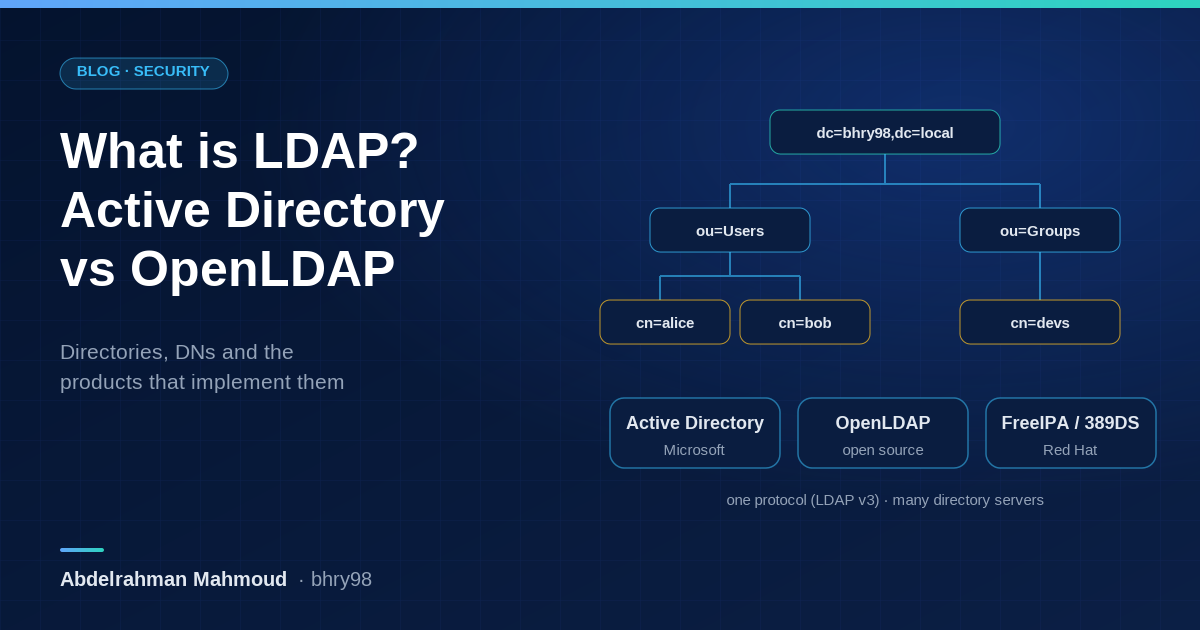
Every time you log in to a company laptop, VPN, Jenkins, GitLab or Keycloak with the same username and password, there is very likely an LDAP directory behind it. This post explains what LDAP is, how a directory is organised, and how the main products compare: Active Directory, OpenLDAP, FreeIPA / 389 Directory Server and friends.
What is LDAP?
LDAP (Lightweight Directory Access Protocol) is an open, standard protocol (version 3, RFC 4511) for reading and writing a directory: a database optimised for many fast reads and few writes, that stores information about users, groups, computers and other resources.
Two things to keep apart:
- LDAP is the protocol: the language clients use (
bind,search,add,modify). - A directory server is the product that stores the data and speaks LDAP: Active Directory, OpenLDAP, 389 DS…
What companies use it for:
- Central authentication: one account for every app ("check this user's password").
- Authorization: group membership (
is alice in cn=devs?). - Address book / lookup: email, phone, manager, department.
- Machine and service info: computers, printers, service accounts.
How a directory is organised
Data lives in a tree (the DIT, Directory Information Tree). Each node is an entry with attributes, and is identified by its Distinguished Name (DN), read from the leaf up to the root:
dc=bhry98,dc=local                       ← root (the domain bhry98.local)
├── ou=Users
│   ├── cn=Alice Ahmed                    DN: cn=Alice Ahmed,ou=Users,dc=bhry98,dc=local
│   └── cn=Bob Hassan
└── ou=Groups
    └── cn=devs                           member: cn=Alice Ahmed,ou=Users,dc=bhry98,dc=local
| Abbreviation | Meaning | Example |
|---|---|---|
dc |
Domain component | dc=bhry98,dc=local |
ou |
Organizational unit (a "folder") | ou=Users |
cn |
Common name | cn=Alice Ahmed |
uid / sAMAccountName |
Login name (OpenLDAP / AD) | alice |
objectClass |
What kind of entry it is (defines allowed attributes) | inetOrgPerson, user, group |
An entry in LDIF, the text format for LDAP data:
dn: cn=Alice Ahmed,ou=Users,dc=bhry98,dc=local
objectClass: inetOrgPerson
cn: Alice Ahmed
sn: Ahmed
uid: alice
mail: alice@bhry98.local
How an application uses LDAP
sequenceDiagram
    participant U as User
    participant A as App (Keycloak, Jenkins...)
    participant D as Directory (LDAP server)
    U->>A: username alice + password
    A->>D: BIND as service account
    A->>D: SEARCH (uid=alice) under ou=Users
    D-->>A: DN cn=Alice Ahmed,ou=Users,...
    A->>D: BIND as that DN with alice's password
    D-->>A: Success (or invalidCredentials)
    A->>D: SEARCH groups where member = alice's DN
    A-->>U: Logged in, roles from groups
Try it from any Linux machine with ldapsearch:
ldapsearch -x -H ldap://dc01.bhry98.local \
  -D "svc-ldap@bhry98.local" -W \
  -b "dc=bhry98,dc=local" "(sAMAccountName=alice)" cn mail memberOf
LDAP vs LDAPS: always encrypt
| Port | Traffic | |
|---|---|---|
| LDAP | 389 | Plain text: passwords in simple binds can be sniffed |
| LDAP + StartTLS | 389 | Starts plain, then upgrades to TLS |
| LDAPS | 636 | TLS from the first byte (like HTTPS) |
| Global Catalog (AD only) | 3268 / 3269 (SSL) | Forest-wide search |
Never send passwords over plain 389 in production. Setting up LDAPS on Active Directory is a step-by-step job, covered in How to secure Active Directory with LDAPS.
The directory products compared
Microsoft Active Directory (AD DS)
Far more than an LDAP server. AD combines LDAP + Kerberos + DNS + Group Policy + replication to manage Windows domains: users log in to Windows PCs, computers get policies, admins use familiar GUI tools.
- Attributes:
sAMAccountName,userPrincipalName(alice@bhry98.local),memberOf. - Multi-master replication between domain controllers, sites, forests and trusts.
- Runs on Windows Server only. The default in most enterprises.
OpenLDAP
The classic open-source LDAP server (slapd) for Linux.
- Lightweight, fast and extremely flexible, with custom schemas and overlays (memberOf, password policy).
- Configured with LDIF (
cn=config). Powerful, but there's no built-in GUI and a steep learning curve. - Great for Linux-only environments, appliances, and as a backend for other products.
389 Directory Server / FreeIPA / Red Hat IdM
389 DS is Red Hat's open-source LDAP server. FreeIPA (sold as Red Hat Identity Management) builds on it with Kerberos, DNS, a certificate authority, sudo rules, host-based access control and a web UI. Think of it as "Active Directory for Linux". It can also trust an AD forest, so Windows users can log in to Linux servers.
Others you'll meet
- Microsoft Entra ID (Azure AD): cloud identity for Microsoft 365. Despite the old name it is not an LDAP server (it uses OAuth2/OIDC/SAML); Entra Domain Services adds managed LDAP. More in What is Microsoft Entra ID?.
- Samba AD DC: an open-source, AD-compatible domain controller on Linux.
- Apache Directory Server / ApacheDS, OpenDJ / PingDS: Java-based LDAP servers.
- JumpCloud, Google Cloud Identity (Secure LDAP): directory-as-a-service with LDAP endpoints.
- Keycloak is not a directory. It uses one: through User Federation it reads users from AD/LDAP and offers modern SSO (OIDC/SAML) to your apps. See How to install Keycloak.
Comparison table
| Active Directory | OpenLDAP | FreeIPA / Red Hat IdM | Entra ID | |
|---|---|---|---|---|
| Type | Full Windows domain service | Pure LDAP server | Linux identity suite | Cloud identity (IdP) |
| Licence | Windows Server licence | Open source | Open source / RH subscription | Microsoft subscription |
| Platform | Windows Server | Linux/Unix | RHEL, Fedora, CentOS Stream | SaaS |
| LDAP v3 | Yes | Yes | Yes (389 DS) | No (only via Domain Services) |
| Kerberos | Built in | Separate (MIT/Heimdal) | Built in | No (cloud Kerberos for hybrid only) |
| Policies for machines | Group Policy (Windows) | No | HBAC, sudo rules (Linux) | Intune / Conditional Access |
| Built-in CA | AD CS (separate role) | No | Dogtag CA, built in | No |
| Admin UI | ADUC, ADAC, PowerShell | CLI / 3rd-party (phpLDAPadmin) | Web UI + CLI | Web portal |
| Best for | Windows-centric companies | Custom, lightweight Linux directories | Linux fleets, AD trusts | Microsoft 365, cloud SSO |
Which one should you choose?
- Mostly Windows PCs and Microsoft software? Active Directory. Nothing else manages Windows as well.
- Linux servers needing central logins, sudo rules and certificates? FreeIPA / Red Hat IdM, optionally trusted with AD.
- An app or appliance that just needs a small LDAP backend? OpenLDAP or 389 DS.
- Cloud-first with Microsoft 365? Entra ID, synced from on-prem AD if you have one (how to set up the sync).
- Modern web apps and APIs? Put Keycloak in front of your directory and let apps use OIDC instead of talking LDAP directly.
Takeaway
LDAP is the common language; Active Directory, OpenLDAP and FreeIPA are different servers that speak it, each with its own extras. Whatever you run, keep the directory as the single source of truth for identities, and always use LDAPS.
Next: Secure your Windows Active Directory with LDAPS (Windows Server 2025)